
xls・xlsx cleanerA cleanup tool for Excel files
Barely any data inside, yet Excel feels heavy.
We remove the cause — without even opening the file.
Repeatedly copying sheets leaves Excel files full of unused formatting, styles, and broken defined names. If your file feels too large for how little data it holds, or copying a sheet triggers a name-conflict popup, this "clutter" may be the cause.
Just drag and drop your file onto the window. No Excel installation required, and batch processing of multiple files is supported.
ExcelReduce file sizeFree version available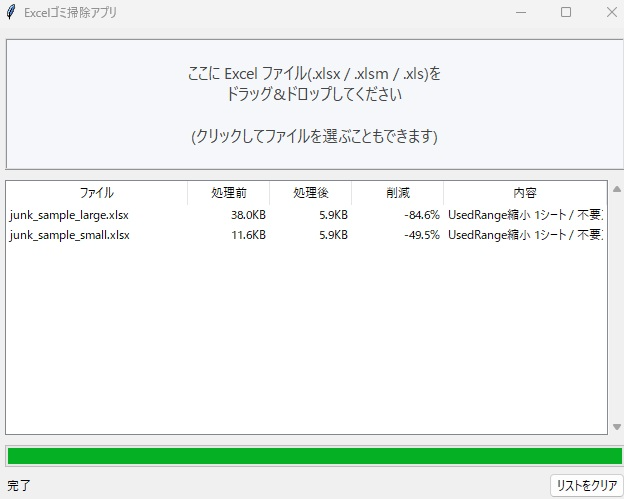
- Fixes an oversized used rangeRestores the sheet's used range to its actual data, even when formatting alone had expanded it
- Removes unused stylesCleans up duplicate styles such as "Normal_1" created by copying
- Removes unused format definitionsStrips fonts, fills, and borders no longer referenced by any cell
- Removes broken defined names (#REF!)Clears out defined names left dangling after sheets were deleted
| Supported files | .xlsx / .xlsm (.xls / .xlsb can also be dropped for detection) |
|---|---|
| Safety | The original file is never modified; a new "xxx_cleaned.xlsx" is saved in the same folder. Your data and appearance are unaffected. |
| Typical results | Around 49%–85% reduction in our test files (results vary by file) |
| Price | Free version: up to 10 files total / Unlock the full version via in-app purchase for unlimited use |
| OS | Windows 10 (1809+) / Windows 11 |
| Language | Japanese / English |